
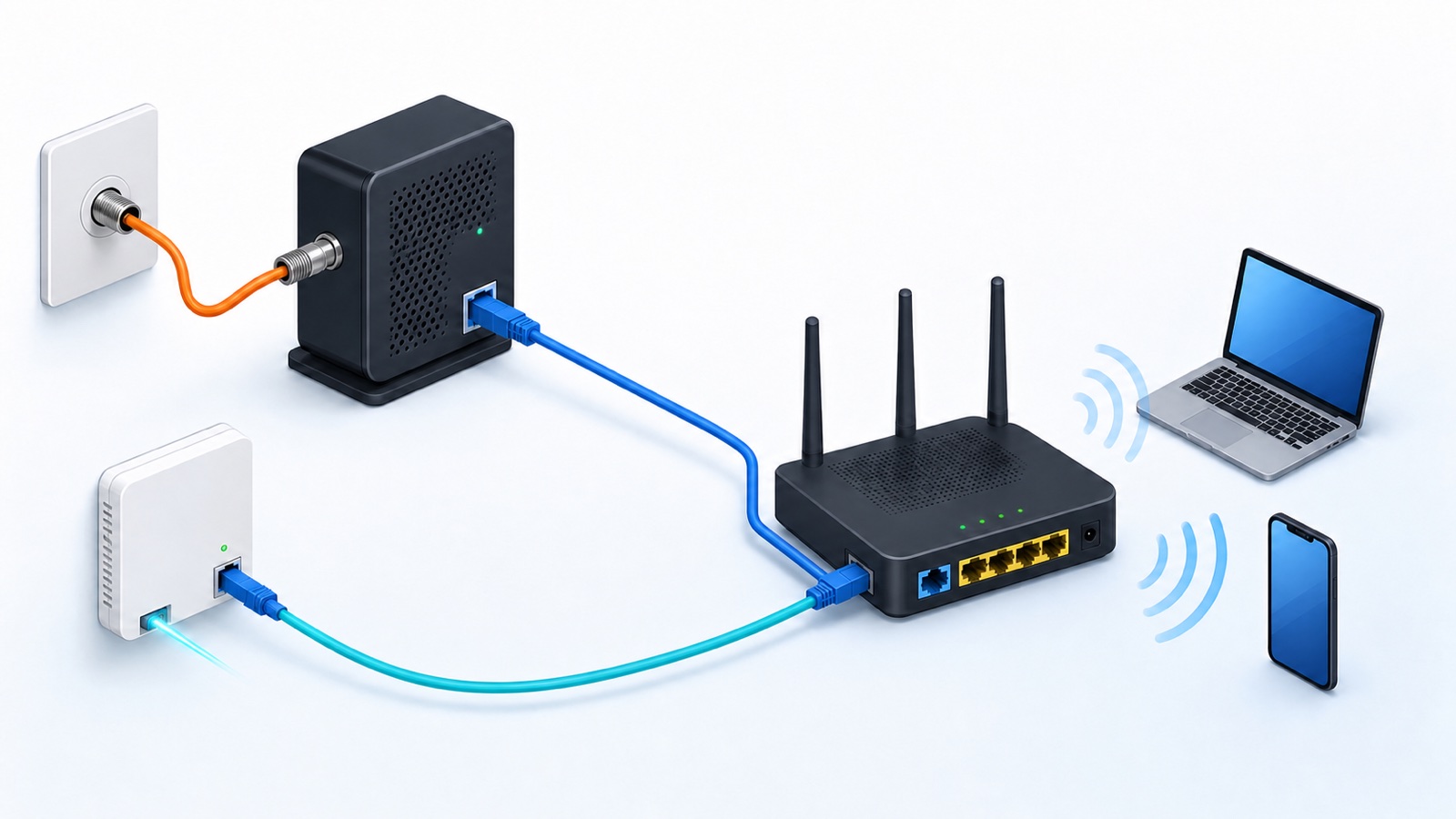
A standalone WiFi router usually does not need a coax cable. With cable internet, coax runs from the wall to a cable modem. An Ethernet cable then connects the modem to the router’s WAN or Internet port. A combined cable gateway accepts coax directly because it contains both the modem and router.
Fiber, DSL, fixed wireless and cellular service use different upstream connections. Check the equipment role and provider instructions before buying a cable or trying to force a connector into the wrong port.
Quick answer by device
| Device | Where coax normally goes |
|---|---|
| Standalone cable modem | From the active cable wall outlet to the modem |
| Standalone WiFi router | Usually nowhere; it receives Ethernet from the modem or ONT |
| Cable modem-router gateway | Directly into the gateway’s Cable or RF input |
| Fiber ONT and router | Often Ethernet; some provider installations use coax with compatible MoCA equipment |
| MoCA adapter or compatible gateway | Coax carries a network signal between supported devices |
Why cable internet uses coax before the router
Coax is the provider-side cable for many cable internet services. A cable modem speaks the provider’s cable-network technology and turns that connection into Ethernet. The router then creates the home network and shares the connection over WiFi and LAN ports.
Google’s modem explanation says a modem converts an inbound connection such as coax into Ethernet so a WiFi router can connect to the internet. The modem, router and ONT guide separates those jobs in more detail.
A combined gateway plugs directly into coax
A cable gateway places the modem, router, Ethernet switch and WiFi radio in one enclosure. Its threaded coax input connects to an active cable outlet. Xfinity’s current gateway activation guide uses that direct wall-to-gateway coax path.
You do not need a second standalone router for basic WiFi when the gateway already performs that job. If you add your own router, it normally connects to the gateway by Ethernet. Review provider bridge or passthrough rules in the own-router compatibility guide to avoid two active routers.
How to tell a router from a cable gateway
Start with the exact model label and manual. A connector marked Cable or RF In may be the cable-modem input. A coax connector marked MoCA has a different networking role; a CATV or antenna connector may be for television. The connector’s shape alone does not tell you which service it accepts. A port labeled WAN or Internet and shaped for an Ethernet plug is usually the router’s upstream input.
Xfinity’s router-identification guide describes the WAN input, LAN ports and the Ethernet cable between separate modem and router equipment. Antennas do not prove that a box is only a router, and their absence does not prove that WiFi is missing.
Fiber and DSL use different handoffs
Full fiber commonly reaches an optical network terminal, or ONT, which often connects to a router by Ethernet. Some provider installations use compatible MoCA equipment to carry that connection over existing coax. The MoCA Alliance’s ONT-to-gateway explanation describes this exception. Follow your provider’s setup rather than removing coax just because the service is fiber. Do not unplug or bend a fiber connector to test a retail router.
DSL normally uses a phone-line-style cable to a DSL modem or gateway. Fixed wireless and cellular gateways may receive service through an outdoor receiver, an indoor radio or a SIM. A coax cable from a previous cable provider does not make those services compatible with a cable modem.
An apartment may provide Ethernet instead
Some apartments, dorms and managed buildings present internet through an Ethernet wall jack. In that setup, a compatible router can connect directly to the provider handoff and no coax or modem is visible in the unit.
Do not assume every wall Ethernet jack is active. It may be an unpatched in-home cable, part of a building network or downstream from an existing router. Ask the provider or property manager which jack supplies service and whether personal routers are permitted.
MoCA is a separate use of coax
MoCA networking can carry a local network connection over existing coax inside a home. A MoCA adapter may connect to the router by Ethernet and to the home’s coax wiring. Some gateways include MoCA support. The MoCA Alliance’s home-network explanation describes reusing coax to connect WiFi equipment.
That does not make every ordinary WiFi router a coax device. MoCA requires compatible equipment, a suitable coax path and provider-aware installation. Check splitters, filters and shared cable service with the provider or a qualified installer instead of changing exterior or grounding hardware.
If your goal is to reach another room over existing wiring, compare the options in the MoCA, Ethernet and powerline guide. That is a different decision from choosing the provider connection for the main router.
Do not use a television coax port as a router input
A television’s coax connector is normally for an antenna or television service. It does not convert a cable internet signal into Ethernet for a router. A cable modem or approved gateway must perform the provider access function.
Likewise, a coax-to-Ethernet shape adapter is not a substitute for a modem. The signals and service activation are different. Use equipment on the provider’s current approved-device list and follow its activation process.
What comes in a cable self-install kit
A cable-provider kit often includes a gateway or modem, coax cable, power supply and instructions. Xfinity’s current kit guide includes coax for its cable installations and notes a fiber-to-the-unit exception.
If you buy separate equipment, confirm whether the modem package includes coax and whether the router package includes Ethernet. The rent-or-buy equipment guide helps compare approval, support, replacement and total cost.
Check these five things before setup
- Identify the internet service type at the exact address.
- Find the modem, ONT, gateway or provider handoff.
- Check the exact equipment model and every labeled input.
- Confirm that the wall outlet is active and approved for self-installation.
- Use the provider’s activation steps before changing splitters or buying adapters.
For a typical separate cable setup, the order is wall coax, cable modem, Ethernet, WiFi router, then wireless devices. If one box combines the modem and router, coax connects to that gateway. Your phone or laptop still joins over WiFi: it does not need its own coax cable.