
A modem or ONT connects your home to the access network run by your internet provider. A router creates the home network and moves traffic between that network and the internet. Cable and DSL service normally use a modem. Full fiber normally uses an optical network terminal, or ONT. You may not see separate boxes because an ISP gateway can combine two or more of these jobs.
The easiest way to identify each device is to follow the incoming service cable. The box connected to coax, a phone line, or fiber is the provider side of the connection. The box whose WAN port connects to it and whose LAN or WiFi connects your devices is the router.
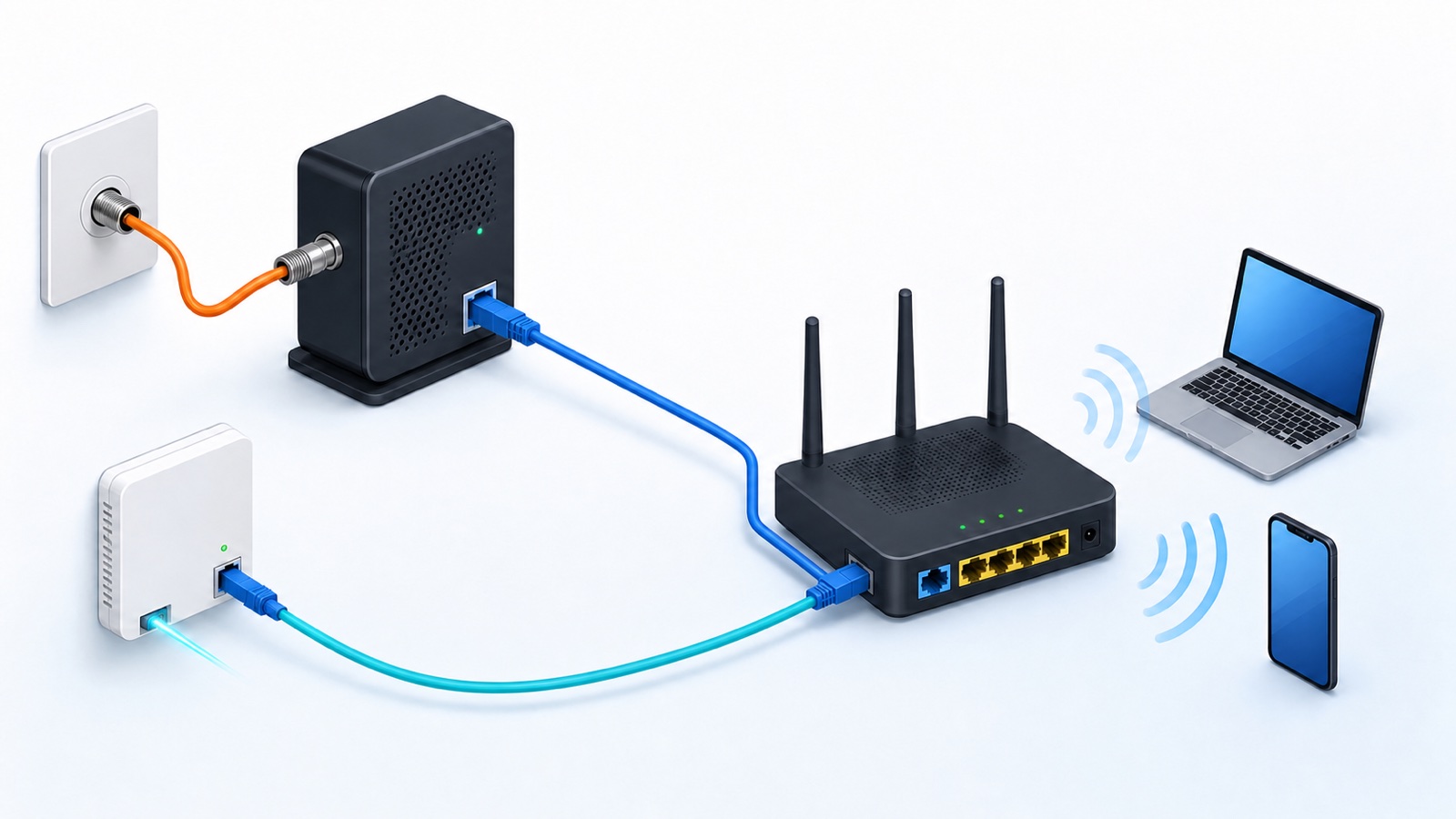
Modem vs router vs ONT at a glance
| Device | Connects to the ISP through | Main job | Usually provides WiFi? | Usually replaceable by the customer? |
|---|---|---|---|---|
| Modem | Coax cable or a DSL phone line | Terminates the cable or DSL link and presents a connection the router can use | No, unless it is a modem router gateway | Sometimes, if the ISP approves and activates the model |
| ONT | Fiber optic cable | Terminates the optical network and commonly presents Ethernet, voice, or other service ports | No, unless routing and WiFi are built into the same unit | Usually not without the provider’s involvement |
| Router | Ethernet from a modem, ONT, or gateway | Connects the home network to the provider network and routes packets between them | Often, but WiFi is an added function rather than the definition of a router | Often, subject to the ISP’s authentication and configuration requirements |
If both services are available at your address, our fiber vs cable internet comparison explains the practical differences in upload speed, latency, equipment, availability, and total price.
If you are paying a monthly equipment charge, use our rent or buy modem and router comparison to calculate the break-even point and check provider compatibility before replacing a gateway.
These are jobs, not reliable descriptions of how many plastic boxes you should have. One device can perform several jobs. A cable gateway may be a DOCSIS modem, router, Ethernet switch, firewall, and wireless access point in one case. A fiber gateway may include an ONT, router, and WiFi radio.
What a modem actually does
A modem terminates a type of access link used by the ISP. A cable modem communicates over the coaxial network using DOCSIS. A DSL modem communicates over the copper telephone pair using a DSL standard. It turns that provider link into a connection that customer equipment can use, commonly Ethernet.
CableLabs describes DOCSIS 3.1 as an industry standard for internet access over hybrid fiber coax networks. That is why a cable modem has a round threaded coax connector on one side and an Ethernet port on the other.
A basic standalone modem does not create your household LAN, choose a route for every local device, or broadcast WiFi. It may pass a public or provider assigned address to the router connected behind it. Many products sold or rented as “modems” are really modem router gateways, which is where the naming becomes confusing.
What an ONT does on a fiber connection
ONT stands for optical network terminal. It is the customer side endpoint of a fiber access network. A standalone ONT accepts the thin fiber entering the property and provides a usable service interface, usually Ethernet for internet service. Some models also have phone or coax ports for services supplied by the same provider.
An ONT fills the same place in the home topology that a cable or DSL modem fills, so people sometimes call it a “fiber modem.” That phrase is understandable, but ONT is the more accurate name. Openreach explains that its ONT converts the incoming fiber signal into a connection a router can use, while remaining separate from the router itself.
A provider usually installs and provisions the ONT as part of its network. Do not move it, unplug the fiber connector, or replace it with a retail device unless the provider tells you to. Dust, a sharp bend, or an incompatible optical profile can break the link. Power can be disconnected for an instructed restart, but the fiber plug should normally stay in place.
What the router does
The router sits at the boundary between two IP networks. In a typical home, one side is the ISP facing WAN and the other is the private LAN used by phones, computers, televisions, and smart devices. It reads the destination information in packets and forwards each packet toward the correct network. Cisco’s router overview describes this packet forwarding role and explains that consumer wireless routers combine several related functions.
A home router commonly also runs DHCP, network address translation, a stateful firewall, DNS forwarding, an Ethernet switch, and a wireless access point. Those useful extras are not all routing. This distinction matters when a system offers access point mode. In that mode, the device can keep serving WiFi while another router handles addressing, firewall policy, and the WAN connection.
If those built-in LAN ports are already full, the 5-port vs 8-port Ethernet switch guide shows how many usable connections each size provides and which other features to check.
The address on the router’s WAN status page is also useful for diagnosing the provider side. If it is private or shared and differs from the public IPv4 shown online, read our guide to testing for CGNAT without confusing it with home double NAT.
Why one gateway can look like all three
Gateway is a broad word. ISPs often use it for an all in one unit that terminates their access link and routes the home network. A cable gateway contains a cable modem and router. A DSL gateway contains a DSL modem and router. A fiber gateway may contain an ONT and router, or it may be a router connected to a separate ONT elsewhere in the building.
Do not identify the job from the provider’s marketing name. Check the cables and ports:
- A threaded coax input points to a cable modem or cable gateway.
- A small phone style DSL input points to a DSL modem or DSL gateway.
- A thin fiber entering the unit points to an ONT or integrated fiber gateway.
- An Ethernet cable entering a port labeled WAN or Internet usually points to a router.
- Several numbered LAN ports, a WiFi name, and a network settings page indicate router, switch, or access point functions are present.
A box can match more than one line in that list. That is evidence of combined functions, not a contradiction.
Which boxes should your internet connection use?
| Service type | Common separate setup | Common combined setup | What the router connects to |
|---|---|---|---|
| Cable internet | Coax to cable modem, then Ethernet to router | Coax to cable gateway with routing and WiFi | The modem’s Ethernet port, unless it is inside the gateway |
| DSL internet | Phone line to DSL modem, then Ethernet to router | Phone line to DSL gateway with routing and WiFi | The DSL modem, unless it is inside the gateway |
| Full fiber internet | Fiber to ONT, then Ethernet to router | Fiber to an integrated ONT router gateway | The ONT’s Ethernet port, unless both roles are integrated |
| Fixed wireless internet | Outdoor or indoor receiver to a router | Receiver and router functions in one gateway | The provider receiver or power injector, depending on the installation |
| Cellular home internet | Less common: cellular modem to router | Cellular modem, router, and WiFi in one gateway | The modem, or nothing external when all roles are integrated |
You normally need the provider termination job and the routing job. You do not necessarily need a modem, an ONT, and a router at the same address. A fiber connection does not add an ONT after a cable modem. It uses an ONT instead of that cable or DSL modem.
Can a router connect directly to an ONT?
Often yes. A standalone ONT with an active Ethernet data port can commonly connect to the WAN port of a compatible router. Physical compatibility is only the first requirement. The ISP may also require DHCP, PPPoE credentials, a VLAN tag, a particular WAN port speed, or registration of customer equipment. Voice and television services can add further requirements.
Ask the ISP whether customer owned routers are supported and which WAN settings are required. Do not assume that an Ethernet socket makes the service plug and play. If the ISP gateway also performs required authentication, it may need to remain in the path even when your own router manages the home network.
Bridge mode belongs on a gateway, not every box
Bridge mode is useful when an ISP gateway and your own router are both routing. It disables or bypasses the gateway’s routing functions so the downstream router can receive the WAN connection and become the only home router. A plain modem or plain ONT is already performing a provider termination role and may have no router mode to disable.
The exact behavior is provider specific. Some gateways offer true bridge mode. Others use a setting called IP Passthrough or a similar name. AT&T, for example, states that its platform does not provide conventional bridge mode and points customers toward provider supported alternatives.
Before changing anything, record the current settings and confirm that the downstream router can perform DHCP, firewall, WiFi, and any ISP authentication the gateway currently handles. Turning off routing without a ready replacement can leave the home offline. If bridge or passthrough is unavailable, another practical design is to keep the ISP gateway as the router and put the second WiFi system in access point mode.
Find the faulty box from the symptoms
| Symptom | Most useful first check | Likely area |
|---|---|---|
| WiFi name is missing, but a wired device connected to the router works | Check the router or access point radio and power | WiFi or access point function |
| Devices join WiFi, but the router shows no WAN link | Check the Ethernet cable between router and modem or ONT | Router WAN port, cable, or provider side device |
| Cable modem’s Online light never becomes stable | Check coax power and the ISP outage status | Cable access link or provider network |
| Fiber ONT shows a red loss of signal light or no optical link | Leave the fiber connector alone and contact the provider after checking power | Optical link or provider network |
| ONT looks normal, but the router has no internet address | Check WAN settings, Ethernet link, account activation, and provider requirements | Router configuration or service provisioning |
| Internet works near the main router but fails around a remote mesh unit | Test the link between mesh units | Local WiFi or backhaul, not the modem or ONT |
Indicator names differ by model, so use the label printed on the device and the provider’s own guide. A red light does not have a universal meaning. On an ONT, a loss of signal indicator is very different from a router’s red internet status light.
If the provider connection is healthy but remote mesh units struggle, check whether Ethernet or wireless backhaul fits the layout before replacing the modem or ONT.
Restart the network in a useful order
A restart can clear a temporary state, but it should preserve the order of the connection:
- Save any work and disconnect calls that depend on the home connection.
- Turn off the router and any separate modem or ONT power supply. Do not remove the fiber plug.
- Restore power to the modem or ONT first.
- Wait for its normal provider link or Online indicator to stabilize. This can take several minutes.
- Restore power to the router and wait for its WAN and WiFi status to become ready.
- Test one wired or nearby WiFi device before restarting every client.
Xfinity’s restart guidance notes that an all in one gateway may take several minutes to return and that internet, phone, and connected services are unavailable during the process. A restart is not a factory reset. Do not press a recessed reset button unless you intend to erase the configuration.
Which device should you replace?
- Replace or upgrade the router when local WiFi coverage, LAN capacity, security support, or home network features are the limitation.
- Replace a cable or DSL modem only with ISP approval when it is incompatible with the subscribed service, unsupported, faulty, or too old for the required access standard.
- Ask the provider about the ONT when optical status is abnormal, the Ethernet handoff cannot support the plan, or the provider requires a newer optical technology. Buying a random ONT is rarely a workable fix.
- Reconfigure a gateway when the hardware is adequate but two routers are causing double NAT or competing DHCP services.
Match the fix to the job that is failing. A new WiFi router cannot repair a lost fiber signal. A new ONT cannot improve a badly placed access point. Once you separate the provider termination job from the home routing and WiFi jobs, both equipment choices and troubleshooting become much more direct.