
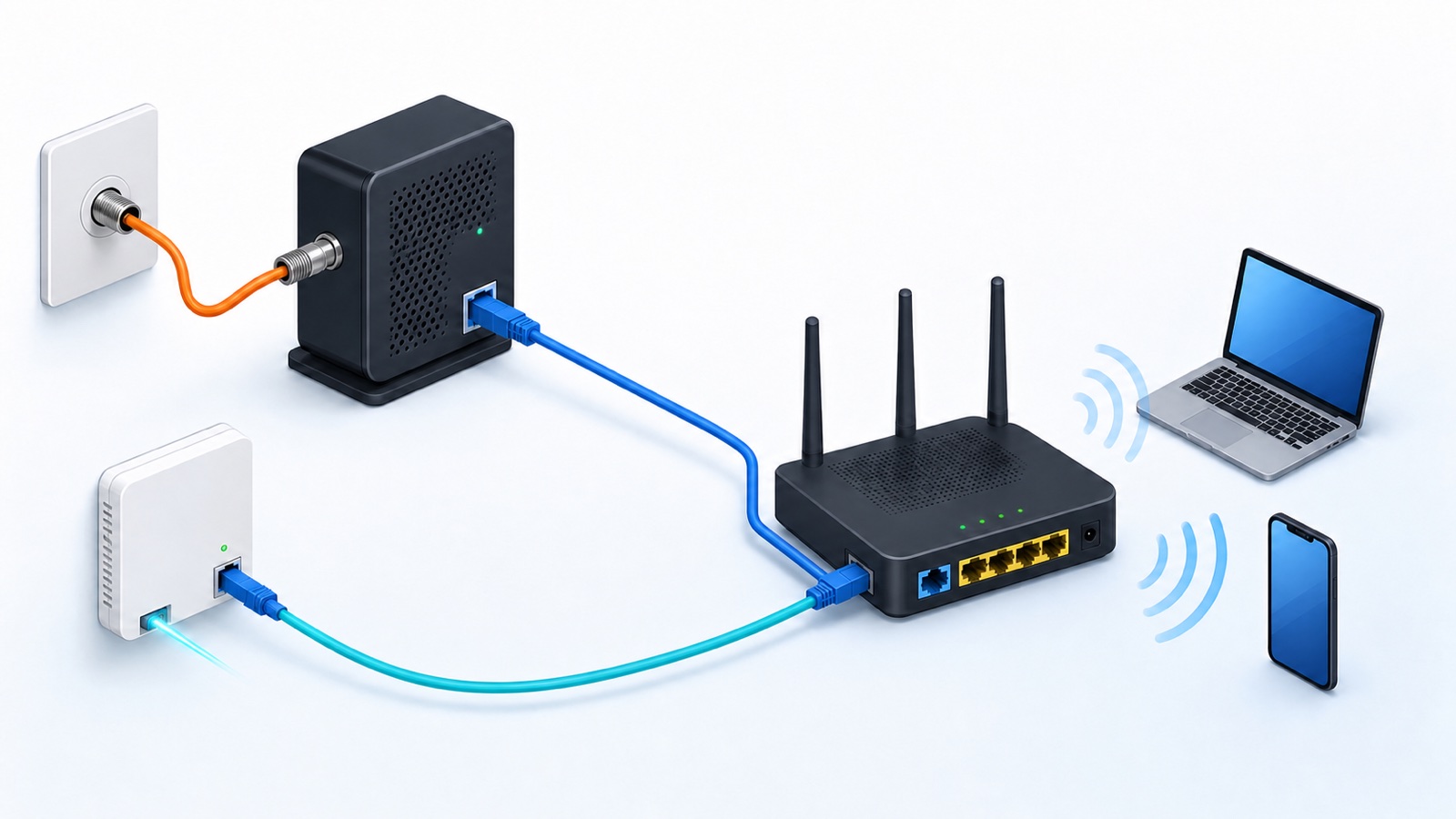
You can sometimes connect a smart TV directly to a standalone modem with Ethernet, but use it as a short test, not your normal home setup. The TV may take the only available internet address, leaving other devices offline, and bypass your router’s firewall. For everyday streaming, connect the modem or ONT to a router, then connect the TV to a router LAN port. A modem-router gateway already contains that router, unless it is in bridge mode.
First identify whether the box is a modem or a gateway
Many providers call every box a modem. A standalone modem normally has the provider input, one or two Ethernet ports and no household WiFi. A gateway combines the modem or ONT job with a router, firewall, Ethernet switch and often WiFi.
| Box beside the provider line | What its Ethernet port usually does | Where the TV should connect |
|---|---|---|
| Standalone cable or DSL modem | Hands the provider connection to one router or test device | Router LAN port |
| Standalone fiber ONT | Hands the provider connection to a router | Router LAN port |
| Modem-router gateway | Provides routed LAN ports | Any supported gateway LAN port |
| Router connected to modem or ONT | Provides the protected home network | Router LAN port or downstream switch |
If the roles are unclear, the modem, router and ONT guide shows how to follow the incoming service cable and identify each box.
When a direct modem connection can work
A direct connection may work when the modem is active, the TV has an Ethernet port, the ISP supplies a usable address and no special sign-in is required. ARRIS documents a computer or router as the typical direct device on its SB8200 cable modem. A television may be able to use the same connection; that is a possibility, not a promise of compatibility from ARRIS.
The modem may remember the device that was connected before the TV. Some providers require a normal modem restart before a new device receives service. Follow the provider or modem instructions and avoid the recessed factory-reset button.
Why the TV may show no internet
- The provider connection has not accepted the change from the previous router or computer.
- The ISP expects activation, a broadband username and password (PPPoE), or another setting the TV cannot supply.
- The provider supplies only one internet address and it is already in use.
- The chosen Ethernet port needs an additional provider address or a supported two-cable router connection called link aggregation. Two ports on a modem do not necessarily mean two devices can go online.
- The television port or cable has no physical link.
- The box is an ONT or managed gateway with provider-specific requirements.
Check the TV network screen for a wired connection and automatic IP assignment. Do not enter a random static IP, gateway or DNS address. An address copied from the router side of the network usually does not belong on the modem side.
A router is the safer long-term path
The router creates the home LAN, shares one provider connection among devices and normally runs a firewall. The FTC recommends keeping the router firewall on and maintaining current router software. A television connected straight to a plain modem may receive a provider-facing address without those router controls.
The TV still needs its own security updates and privacy settings. A router does not repair an unsupported television, but it gives the television the same managed network boundary used by the rest of the home.
Use this wiring for a standalone modem or ONT
- Connect the modem or ONT Ethernet output to the router WAN or Internet port.
- Wait for the router to receive its internet connection.
- Connect the smart TV to a numbered router LAN port.
- Set the TV wired connection to automatic IP and DNS unless the network administrator specifies otherwise.
- Open two streaming apps or a browser page to confirm service.
Google’s current wired-network guide uses the same order: modem LAN to router WAN, then wired devices downstream of the router. If the router is in another room, use a properly installed Ethernet run, a downstream switch or WiFi rather than moving the provider equipment without checking its line.
The TV menu varies by model. On many Samsung TVs, open Settings, then General, Network and Open Network Settings, and select Wired. Newer menus may put Network under Connection instead. Follow your model’s manual if those labels differ. An Ethernet cable uses the LAN socket, not HDMI, USB or the threaded coaxial TV input.
A modem-router gateway is different
If the provider box broadcasts WiFi and has several numbered LAN ports, it is probably a gateway. In normal router mode, connecting the television to one of those LAN ports keeps it behind the built-in router. Check the operating mode, not just the number of sockets: bridge or passthrough mode can change what protection and addresses those ports provide.
A separate personal router behind the gateway can create double NAT, but that is a different issue. Keep the gateway routing unless you have a reason and provider-approved instructions for bridge or passthrough mode.
Do not place an ordinary switch before the router
An unmanaged Ethernet switch adds ports inside a LAN. It does not normally perform routing, firewall or address-sharing work. Placing a switch between a plain modem and several home devices can leave only one device online or expose each device to the provider side when the ISP supplies multiple addresses.
The usual order is modem or ONT, router, switch, then television and other wired devices. A gateway already includes the router stage, so a switch can connect to one of its LAN ports.
How to use a direct connection as a diagnostic test
If your provider recommends it, a temporary direct test can help isolate a separate router problem. Use an updated laptop with its own firewall enabled; it can show connection details and open an activation page more easily than a TV. Disconnect the router, connect that single test device to the modem and follow the provider’s restart sequence if required. Do not turn off the laptop’s firewall to make the test work.
Keep the test short. Disconnect the test device, restore the modem-to-router cable, restart the modem only if required for the device change and verify that the router comes back online. This test interrupts internet service for everyone using that router.
Will a direct modem cable make streaming faster?
Bypassing the router does not increase the speed of your internet plan. A direct test might avoid a faulty router or a poor WiFi link, but first try Ethernet from the router to the TV. That checks the wired connection without removing the router’s protection. The TV port, router, modem, cable and service can all limit performance.
If Ethernet from the router works but WiFi does not, check the saved network password, signal strength, interference and the TV’s supported WiFi bands. That result narrows the search; it does not prove which one is at fault. If both connections buffer, compare another app and device before blaming the router or provider. The router replacement checklist helps you decide what to check before buying hardware.
If the TV has no Ethernet port
Connect the television to the router or gateway over WiFi. A USB-to-Ethernet adapter works only when the exact TV model supports it. The presence of a USB port does not guarantee network-adapter support, so check the television manual before buying one.
Sources
- Google Home Help: What is a modem?
- Google Home Help: Hardwire a router and downstream devices
- ARRIS Consumer Care: SB8200 first-time installation
- ARRIS Consumer Care: What the SB8200’s two Ethernet ports support
- Samsung Support: Connect a TV using a wired network
- Federal Trade Commission: Secure your home WiFi network